Every agent. One control plane.
Agent Control is where you build, train, ground, evaluate, and ship AI agents — agents, fine-tuning, datasets, training jobs, pipelines, embeddings, knowledge bases, prompts, tools, benchmarks, metrics, MCP servers, and logs. All in one place, all scriptable with vxcli.
Bring any model & provider — train, ground, and serve from one console
Everything Agent Control does
Eighteen surfaces. One AI lifecycle, end to end.
From the first dataset to a benchmarked, grounded agent serving live traffic — every step in the agent lifecycle has a home in Agent Control.
Home
A single control center for every agent, model, dataset, and run across your org.
My Agents
6Create, version, and deploy autonomous agents — each with its own tools, prompts, and model.
Playground
Chat with any agent or model interactively — compare outputs, tweak params, save prompts.
Fine Tuning
1Fine-tune base models on your data with LoRA / full-parameter runs and one-click deploy.
Models & Endpoints
2A model registry plus live serving endpoints — bring your own weights or upload custom models.
Datasets
11Upload, version, and curate training datasets; preview, split, and attach them to runs.
Training
5Pre-training, RLHF, distillation, and custom runs — with live loss, accuracy, and GPU-hour tracking.
Pipelines
6Compose multi-stage training + eval + deploy pipelines that run end-to-end on a schedule.
Embeddings
0Generate and store vector embeddings for semantic search and retrieval over your corpora.
Knowledge
2Build FAISS-backed knowledge bases for RAG — ground every agent answer in your private docs.
Prompts Manager
A reusable prompt library with variables, versions, and one-click attach to any agent.
Tools & Actions
1Register tools and actions agents can call — HTTP, shell, provisioning, and custom functions.
Benchmarks
22Score models and agents against eval suites; track regressions across versions.
Metrics
Latency, token usage, cost, and accuracy dashboards across every agent and endpoint.
Web Assets
2Crawl and ingest web sources into datasets and knowledge bases for grounding.
Programming
An in-browser code editor to script agents, build knowledge bases, and run vxcli — no local setup.
MCP Servers
9Connect Model Context Protocol servers so agents reach external tools and data sources.
Logs
Full audit trail of every run, call, and deploy — searchable, exportable, compliance-ready.
See it in action
The real console — tagged so you know what you're looking at
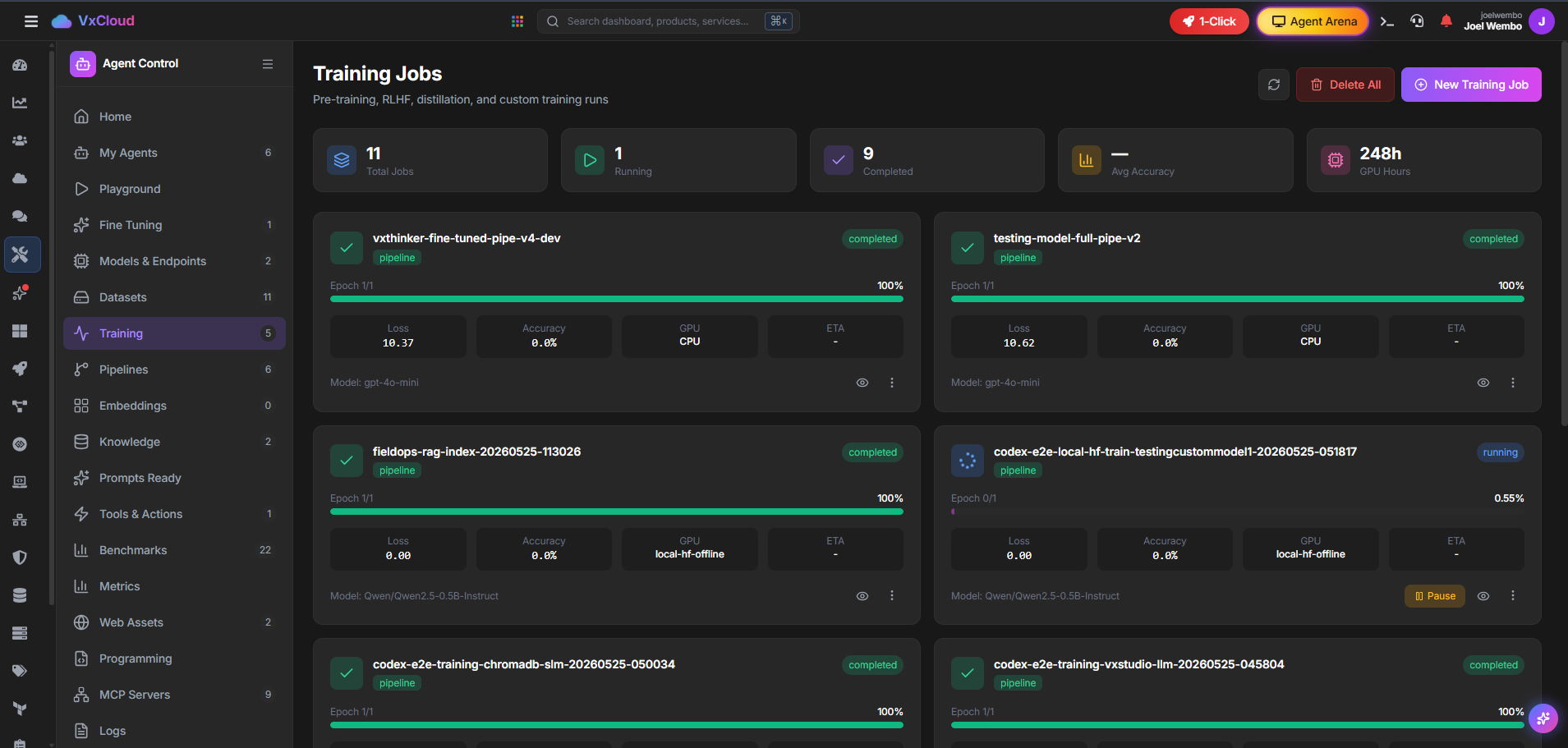
Training Jobs
Pre-training, RLHF, distillation & custom runs — live.
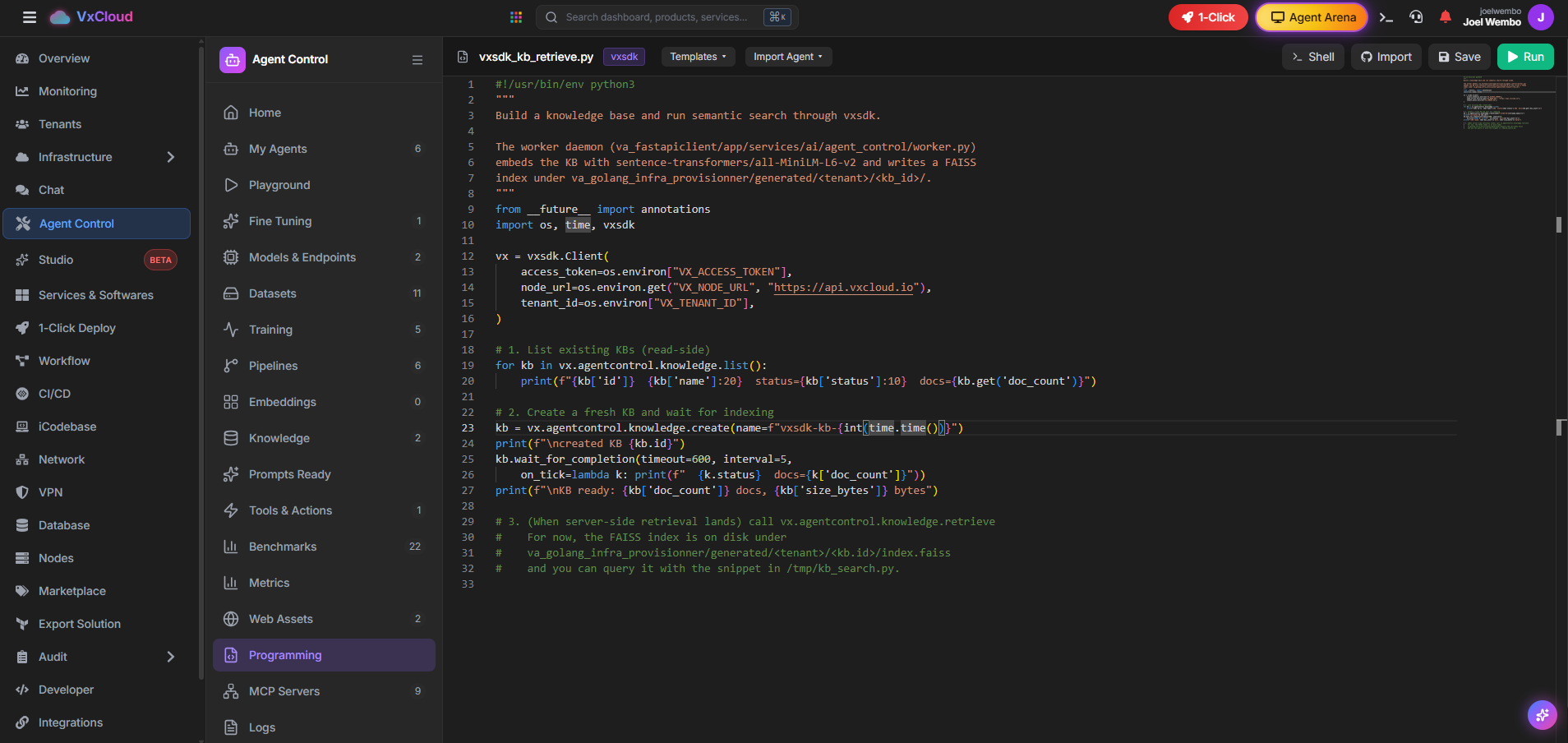
Programming
In-browser editor — build knowledge bases & RAG with vxcli.
Training, watched live
Pre-training, RLHF, distillation & custom runs — in real time
Every job streams its epoch progress, loss, accuracy, GPU target, and ETA. Run on CPU, local offline GPUs, or burst to cloud accelerators — and gate deploys on benchmark thresholds.
- Live loss / accuracy / GPU-hour tracking per job
- Pause, resume, delete, and clone runs from the card
- LoRA & full-parameter fine-tuning on your datasets
- Pipelines chain train → benchmark → deploy → ground
The console is a CLI too
Everything you click, you can script with vxcli
Create agents, push datasets, launch training, build knowledge bases, wire MCP servers, and run end-to-end pipelines — from the same CLI that powers the dashboard and the in-browser Programming editor.
- vxcli agent / training / model / pipeline commands
- FAISS knowledge bases built and queried from the CLI
- MCP servers registered with Vault-backed auth
- Reproducible pipeline.yaml checked into your repo
1# Agent Control, scripted. Everything in the dashboard is a vxcli command.2 3# 1) Create an agent with a model, tools, and a knowledge base4vxcli agent create fieldops \5 --model vxthinker:cloud \6 --tools http,shell,provision \7 --knowledge kb_fieldops \8 --prompt prompts/fieldops-system.md9 10# 2) Attach a dataset and kick off a training run11vxcli dataset push ./data/fieldops.jsonl --name fieldops-sft12vxcli training start \13 --base Qwen/Qwen2.5-0.5B-Instruct \14 --dataset fieldops-sft \15 --method lora \16 --name fieldops-rag-index17 18# 3) Watch the run live (loss, accuracy, GPU hours)19vxcli training list --status running20vxcli training logs <job-id> --follow21 22# 4) Deploy the fine-tuned model to an endpoint23vxcli model deploy fieldops-rag-index --endpoint fieldops-prod --gpu local-hf-offlineScaffold an agent from a goal
vxcli agent new "field-ops assistant grounded in our runbooks" — creates the agent, KB, dataset stub, and a starter pipeline.
Agents that can actually do things
Tools, Actions & MCP — wire agents to the real world
MCP Servers
Connect Model Context Protocol servers so agents reach Jira, GitHub, databases, and internal APIs.
Tools & Actions
Register HTTP, shell, and provisioning actions agents can invoke — with Vault-backed credentials.
Knowledge & RAG
Ground answers in FAISS knowledge bases built from your docs, runbooks, and crawled web assets.
Benchmarks & gates
Score agents against eval suites and block deploys that regress on accuracy, safety, or tool-use.
Metrics & cost
Track latency, token usage, and spend per agent and endpoint — catch runaway cost early.
Audit logs
Every run, tool call, and deploy is logged, searchable, and exportable for compliance.
The lifecycle, in order
Dataset → Train → Benchmark → Ground → Deploy → Observe
Build, train, and ship agents from one place.
Datasets, training, pipelines, knowledge, tools, MCP, benchmarks, and metrics — all in Agent Control, all scriptable with vxcli.