Zero Trust Configuration: The 90-Day Hardening Playbook
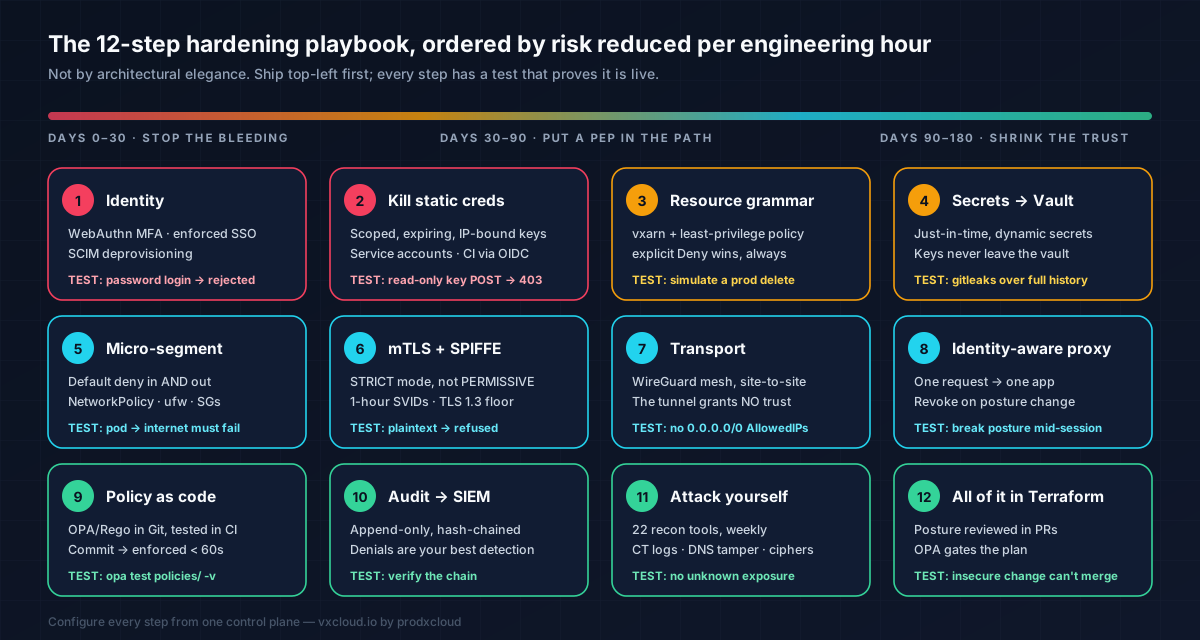
Twelve configuration steps in risk-reduction order, with the actual config files and the test that proves each control is live: phishing-resistant MFA, scoped keys, least-privilege policy, Vault secrets, default-deny egress, SPIFFE and STRICT mTLS, WireGuard, OPA/Rego in CI, hash-chained audit and Terraform gating.

vxcloud Security Engineering
@vxcloud
Zero Trust architecture, identity and access, secrets, network segmentation and audit — from the security engineering team at prodxcloud.

Zero Trust configuration playbook — a terminal running hardening commands beside a padlock assembled from policy blocks
Photo: vxcloud Security EngineeringYou already accept that network-location trust is dead. Now you need to configure something on Monday morning. This is the implementation companion: twelve configuration steps in risk-reduction order, with the actual files, the actual commands, and — critically — the test that proves each control is live.
A control you have not tested is not a control. It is a comment.
Before you touch a config file: measure your blast radius
Do not start with technology. Start with a number, because without it you cannot prove the programme worked and you will lose its budget in the next cost review.
Blast radius = the count of resources reachable by one compromised principal. Pick your most ordinary engineer. Assume their laptop is owned right now — because in the scenario you are defending against, it is.
# Day 0 baseline. Run it, write the number down, put it on a slide.

# 1. What can that identity's credentials reach today?
vxcli auth whoami
vxcli node list                      # every node the identity can see
vxcli networks list                  # every reachable network surface

# 2. What is actually exposed to the internet right now?
vxcli networks port-check 443 --host <your-edge-host>
vxcli networks security-audit --host <host> --ssh-user ubuntu --key-pair-name <key>

# 3. How many long-lived credentials exist, and when were they last rotated?
#    (If this number is > 0, Step 2 is your entire month.)
Write three numbers where the team can see them.
| Metric | Day 0 | Day 90 target |
|---|---|---|
| Resources reachable by one compromised employee identity | ____ | ≤ 3 |
| Long-lived (non-expiring) credentials in production | ____ | 0 |
| Mean time from "policy change committed" to "enforced everywhere" | ____ | < 60 s |
Everything below moves those three numbers. If a proposed control does not move one of them, it is not a priority. Say that out loud in planning.
Note on commands. Examples use the
vxclicommand groups shipped today —auth,node,networks,vpn,workspace,audit,agentcontrol. Flags evolve; runvxcli <group> --helpfor the authoritative list, or read the CLI reference.
Step 1 — Identity: phishing-resistant MFA and enforced SSO
Threat closed: stolen credentials, which sit at or near the top of initial-access vectors in every DBIR ever published, plus the MFA-fatigue and adversary-in-the-middle attacks that defeat push and SMS.
TOTP is a floor, not a target. WebAuthn/FIDO2 hardware-backed authenticators are the only phishing-resistant factor — they cryptographically bind to the origin, so a proxy phishing page gets nothing. This is what OMB M-22-09 mandates for federal agencies and what NIST SP 800-63B rates highest.
Dashboard: Settings → Security → Multi-Factor Authentication → Require MFA for all members → allowed factors WebAuthn, TOTP. Uncheck SMS; it is a SIM-swap away from useless.
SSO federation: Settings → Organization → Single Sign-On. VxCloud supports SAML 2.0 and OpenID Connect against Okta, Microsoft Entra ID, Google Workspace, JumpCloud and OneLogin.
# Reference SAML config — values come from your IdP's metadata document
sso:
  protocol: saml2
  entity_id:  https://vxcloud.io/sso/saml/<account-id>
  acs_url:    https://vxcloud.io/sso/saml/<account-id>/acs
  idp_metadata_url: https://<your-idp>/app/<app-id>/sso/saml/metadata
  name_id_format: EmailAddress
  attribute_mapping:
    email:  "http://schemas.xmlsoap.org/ws/2005/05/identity/claims/emailaddress"
    groups: "http://schemas.xmlsoap.org/claims/Group"
  enforce_sso: true            # the setting that actually matters
  disable_password_login: true # and this one
  scim_provisioning: true      # deprovision on termination, automatically
enforce_sso and disable_password_login are the two lines that make this a control. Without them you have added a convenient login method next to an insecure one, and attackers will use the second. SCIM matters because the alternative — manual deprovisioning — is how ex-employees keep production access for eleven months.
Prove it. Try a password login for a federated user; it must be rejected outright. Try an API call with a session that never satisfied MFA; it must 401 or 403. Deactivate a user in the IdP and confirm SCIM revokes access within your SLA — and that their live session dies, not just their next login. If that last test fails, your identity pillar is decorative.
Step 2 — Execute every long-lived credential in your estate
Threat closed: the credential that outlives its purpose. Colonial Pipeline was a dormant VPN account with no MFA. Your equivalent is a PROD_API_KEY created in 2022 by someone who now works elsewhere.
Rule, no exceptions: every credential expires. If a credential cannot expire, it is not a credential — it is a permanent backdoor with a friendly name.
VxCloud API keys are environment-prefixed so blast radius is legible in a single log line, stored only as a SHA-256 hash — the plaintext is shown once and never again — and carry real constraints.
| Prefix | Environment | Should ever touch customer data? |
|---|---|---|
xc_live_ | Production | Yes — treat as radioactive |
xc_stg_ | Staging | No |
xc_dev_ | Development | No |
xc_sbx_ | Sandbox | No |
xc_prev_ | Preview / ephemeral | No |
{
  "name": "ci-deploy-web",
  "environment": "xc_live_",
  "expires_at": "2026-11-05T00:00:00Z",
  "is_read_only": false,
  "allowed_services":    ["deployments", "containers", "networks"],
  "disallowed_services": ["billing", "iam", "vaults", "agentcontrol"],
  "allowed_ips":  ["203.0.113.0/24"],
  "rate_limit":   600,
  "scopes": ["deploy:write", "containers:read", "networks:read"]
}
Note expires_at: 90 days, not "never." Never is not a duration.
Then bind automation to service accounts, not humans. A personal token running your deployment pipeline is a resignation letter away from an outage — and it attributes machine actions to a human in your audit log, which corrupts every investigation you will ever run.
# Automation identity — no console login, no password, no human owner
vxcli iam service-account create --name ci-github-actions \
  --policy ci-deploy-minimal --expires 90d
Better still: no stored key at all. If your CI supports OIDC federation — GitHub Actions, GitLab and Buildkite all do — exchange a short-lived workload token for temporary credentials and store nothing.
# .github/workflows/deploy.yml — zero stored secrets
permissions:
  id-token: write          # request an OIDC token from GitHub
  contents: read
jobs:
  deploy:
    runs-on: ubuntu-latest
    steps:
      - uses: actions/checkout@v4
      - name: Exchange OIDC token for short-lived VxCloud credentials
        run: |
          vxcli auth login --oidc \
            --token "$ACTIONS_ID_TOKEN_REQUEST_TOKEN" \
            --audience vxcloud.io --ttl 15m
      - uses: prodxcloud/vxcloud-deploy-action@v1
A 15-minute credential exfiltrated at 02:00 is worthless by 02:16. That is the whole game.
Prove it.
# Read-only key must fail a write:
curl -sS -X POST https://<node>/api/v2/deployments \
  -H "Authorization: Bearer $READONLY_KEY" -d '{}' | jq .   # expect 403

# Key from an unlisted IP must fail:
curl -sS https://<node>/api/v2/nodes -H "Authorization: Bearer $CI_KEY"  # expect 403 off-range
Do these tests; do not assume them. "Scopes stored but never enforced" is one of the most common findings in real IAM audits — the columns exist, the UI shows a read-only badge, and the middleware never reads them. A read-only key that can write is worse than no key management at all, because it manufactures false confidence.
Step 3 — A resource grammar and real least-privilege policy
Threat closed: the wildcard permission granted at 2 a.m. to unblock a deploy, still there three years later.
You cannot write least-privilege policy until every resource has a name you can pattern-match. This is the single most irreversible decision in a Zero Trust programme: pick the grammar before you have twenty resource types, because retrofitting it breaks every stored policy, reference and audit correlation you have written.
vxarn:vxcloud:<service>:<region>:<account-id>:<resource-type>/<resource-id>

vxarn:vxcloud:vpn:us-east-1:472910538812:server/3ea2a6b0-6e49-4684-a979-7a51b68acb45
vxarn:vxcloud:agentcontrol:*:472910538812:agent/bd052eca-3f9a-4e34-ae6f-5045659b6ad2
vxarn:vxcloud:databases:eu-west-1:472910538812:instance/prod-orders
The policy document is JSON, AWS-shaped, deliberately a strict subset — because a policy language nobody can read is a policy language nobody reviews.
{
  "Version": "2026-08-03",
  "Statement": [
    {
      "Sid": "AppTeamReadProdInfra",
      "Effect": "Allow",
      "Action": ["vpn:List*", "vpn:Get*", "databases:Describe*", "containers:Get*"],
      "Resource": "vxarn:vxcloud:*:*:472910538812:*"
    },
    {
      "Sid": "DeployOnlyToStaging",
      "Effect": "Allow",
      "Action": ["deployments:Create", "deployments:Update"],
      "Resource": "vxarn:vxcloud:deployments:*:472910538812:*",
      "Condition": { "StringEquals": { "vx:Environment": "STAGING" } }
    },
    {
      "Sid": "NeverDeleteInProduction",
      "Effect": "Deny",
      "Action": ["*:Delete*", "*:Terminate*", "*:Destroy*"],
      "Resource": "*",
      "Condition": { "StringEquals": { "vx:Environment": "PRODUCTION" } }
    },
    {
      "Sid": "RequireMfaForSecrets",
      "Effect": "Deny",
      "Action": ["vaults:*", "iam:*"],
      "Resource": "*",
      "Condition": { "Bool": { "vx:MultiFactorAuthPresent": "false" } }
    }
  ]
}
Three rules make this work in production:
- Evaluation order is explicit Deny → Allow → implicit Deny. An explicit Deny cannot be overridden by any subsequent Allow. That is why
NeverDeleteInProductionis safe to grant broadly — it is a floor nobody can dig under, including an account admin having a bad day. - Permissions are additive across scopes — account → workspace → resource. Grant broad read at account level, narrow write at workspace level.
RequireMfaForSecretsis the pattern to copy everywhere. Condition-gate your highest-value actions on session properties: MFA presence, device compliance, source network, time of day. That is NIST's "dynamic policy" tenet, written down in something a machine enforces.
Prove it.
vxcli iam policy simulate \
  --principal "vxarn:vxcloud:iam::472910538812:user/35" \
  --action    "databases:DeleteInstance" \
  --resource  "vxarn:vxcloud:databases:eu-west-1:472910538812:instance/prod-orders"
# expect: DENY  (matched Sid=NeverDeleteInProduction)
Then run the review that actually finds the rot: diff permissions granted against permissions used over the last 90 days, from the audit log. Everything granted-and-never-used is a permission to revoke. Schedule it quarterly; it is the highest-yield hour of security work available to you.
Step 4 — Secrets: Vault, just-in-time, never in code
Threat closed: secret sprawl. .env files, CI variables, that one Confluence page, a Slack DM from 2023, and the notebook on a laptop in an airport lounge.
Every VxCloud workspace gets a per-tenant HashiCorp Vault namespace — KVv2, AppRole and JWT auth — with secrets resolved just-in-time at deploy and scrubbed from container environments afterwards.
# Store — value comes from stdin, never from shell history or a flag
vxcli workspace store-credential --name PROD_DB_PASSWORD --stdin --rotate
vxcli workspace store-git-credentials --provider github --stdin

# Read — every read is policy-checked and lands in the audit log
vxcli workspace get-credential --name PROD_DB_PASSWORD
# Vault policy for a deploy service account — read one path, nothing else.
path "secret/data/workspaces/<workspace-id>/deploy/*" {
  capabilities = ["read"]
}
path "secret/data/workspaces/<workspace-id>/*" {
  capabilities = ["deny"]        # explicit, so a future wildcard cannot widen it
}
Four rules. Dynamic secrets over static ones — Vault's database engine mints a per-session DB user with a 1-hour TTL, so there is no "database password" to steal, rotate or leak; the concept ceases to exist. Private keys are generated server-side and never leave Vault — if a human can copy the private key, so can malware on that human's laptop. Key IDs in config, values at runtime — your repo should contain PROD_DB_PASSWORD as a reference. And customer-managed keys where it matters, via AWS KMS, Azure Key Vault, GCP KMS or self-hosted Vault Transit, so your provider never holds the only copy of the key protecting your data.
Prove it.
# Scan history for committed secrets (do this in CI, on every PR):
gitleaks detect --source . --redact
trufflehog filesystem . --only-verified

# Confirm secrets are absent from the running container's environment:
docker exec <container> env | grep -iE 'password|secret|token|key'   # expect: nothing
Step 5 — Micro-segmentation: default deny, both directions
Threat closed: lateral movement — MITRE ATT&CK TA0008. This is the step that collapses blast radius, and the one most teams skip because it is the one that briefly breaks things.
Default-deny inbound is table stakes. Default-deny egress is where the actual value is — it is what stops data exfiltration and command-and-control after the initial compromise you failed to prevent.
# ufw — deny everything, allow the minimum, verify
ufw default deny incoming
ufw default deny outgoing                   # the line nobody wants to write
ufw allow in on wg0 from 10.80.0.0/16 to any port 8443 proto tcp
ufw allow out to 10.80.0.0/16               # mesh peers
ufw allow out 53/udp                        # DNS (pin to your resolver)
ufw allow out 443/tcp to 203.0.113.10       # package mirror, by IP, not "anywhere"
ufw --force enable && ufw status numbered
# /etc/ssh/sshd_config.d/99-zero-trust.conf
PasswordAuthentication no
PermitRootLogin no
KbdInteractiveAuthentication no
PubkeyAuthentication yes
AuthenticationMethods publickey
AllowGroups ssh-prod
ClientAliveInterval 300
ClientAliveCountMax 2
X11Forwarding no
AllowAgentForwarding no
AllowTcpForwarding no          # stop SSH being an ad-hoc VPN into your estate
MaxAuthTries 3
LogLevel VERBOSE               # logs the key fingerprint used — you need this
AllowTcpForwarding no is the sleeper. An engineer with SSH and TCP forwarding has a personal, unlogged tunnel that bypasses every network control you just configured.
# 1. Default-deny EVERYTHING in the namespace — ingress and egress.
apiVersion: networking.k8s.io/v1
kind: NetworkPolicy
metadata: { name: default-deny-all, namespace: prod }
spec:
  podSelector: {}
  policyTypes: [Ingress, Egress]
---
# 2. Then allow exactly one path: api → postgres, on one port.
apiVersion: networking.k8s.io/v1
kind: NetworkPolicy
metadata: { name: api-to-postgres, namespace: prod }
spec:
  podSelector: { matchLabels: { app: postgres } }
  policyTypes: [Ingress]
  ingress:
    - from:
        - podSelector: { matchLabels: { app: api, tier: backend } }
      ports: [{ protocol: TCP, port: 5432 }]
---
# 3. DNS is the exception everyone forgets — allow it explicitly or nothing resolves.
apiVersion: networking.k8s.io/v1
kind: NetworkPolicy
metadata: { name: allow-dns-egress, namespace: prod }
spec:
  podSelector: {}
  policyTypes: [Egress]
  egress:
    - to: [{ namespaceSelector: { matchLabels: { kubernetes.io/metadata.name: kube-system } } }]
      ports: [{ protocol: UDP, port: 53 }, { protocol: TCP, port: 53 }]
Kubernetes NetworkPolicy is an additive allow-list on top of a deny baseline: the deny policy establishes the baseline, each subsequent policy opens one door. NetworkPolicy is CIDR and label-based; for genuine identity-based segmentation, layer Step 6's authorisation policies on top.
On the managed side, VxCloud Networking gives you per-tenant VPCs across AWS, Azure, GCP, Alibaba, Linode and bare metal with default-deny security groups — ports opened explicitly, per deployment, and never "temporarily" left open, because the wizard writes the rule and Terraform reviews it.
Prove it.
# From a pod that should NOT have access — this must hang and time out:
kubectl -n prod run probe --rm -it --image=busybox --restart=Never \
  -- sh -c 'nc -zvw3 postgres 5432; echo "exit=$?"'     # expect: failure

# From the api pod — this must succeed:
kubectl -n prod exec deploy/api -- nc -zvw3 postgres 5432

# Egress containment — this must fail from a production pod:
kubectl -n prod exec deploy/api -- curl -m 5 https://example.com   # expect: timeout
If curl https://example.com succeeds from your production pod, you do not have egress control, and exfiltration is a one-liner for whoever gets in.
Step 6 — mTLS and workload identity with SPIFFE/SPIRE
Threat closed: the static service-to-service API key that has been in Git since 2022 and authenticates half your microservices.
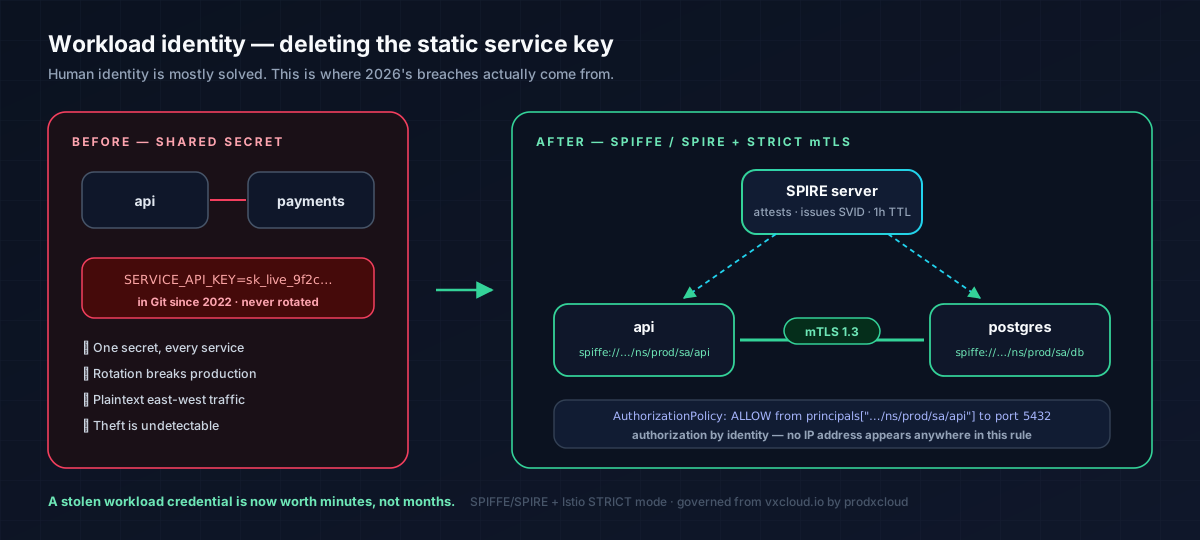
Human identity is mostly solved. Workload identity is where 2026's breaches live. The fix is SPIFFE/SPIRE, CNCF-graduated, where every workload gets a short-lived cryptographic identity (an SVID) and proves it via mutual TLS, with no shared secret anywhere in the system.
# spire-server.conf
server {
  trust_domain = "prod.vxcloud.io"
  data_dir     = "/opt/spire/data/server"
  ca_ttl       = "24h"
  default_x509_svid_ttl = "1h"     # short. shorter than you're comfortable with.
}
plugins {
  NodeAttestor "k8s_psat" { plugin_data { clusters = { "prod" = { service_account_allow_list = ["spire:spire-agent"] } } } }
  KeyManager   "disk"     { plugin_data { keys_path = "/opt/spire/data/server/keys.json" } }
}
# Register a workload identity, attested by k8s labels — not by a secret
spire-server entry create \
  -spiffeID  spiffe://prod.vxcloud.io/ns/prod/sa/api \
  -parentID  spiffe://prod.vxcloud.io/ns/spire/sa/spire-agent \
  -selector  k8s:ns:prod -selector k8s:sa:api -ttl 3600
Then enforce mTLS at the mesh and authorise by identity, not by IP (Istio security).
# STRICT mTLS mesh-wide — plaintext is refused, not merely discouraged
apiVersion: security.istio.io/v1
kind: PeerAuthentication
metadata: { name: default, namespace: istio-system }
spec:
  mtls: { mode: STRICT }
---
# Authorization by workload identity + method + path. IPs appear nowhere.
apiVersion: security.istio.io/v1
kind: AuthorizationPolicy
metadata: { name: postgres-access, namespace: prod }
spec:
  selector: { matchLabels: { app: postgres } }
  action: ALLOW
  rules:
    - from: [{ source: { principals: ["cluster.local/ns/prod/sa/api"] } }]
      to:   [{ operation: { ports: ["5432"] } }]
mtls: { mode: STRICT } is the line. PERMISSIVE accepts plaintext and is a migration setting — teams leave it on for eighteen months and believe they have mTLS. Set a calendar reminder to flip it, and verify.
# TLS 1.3 only, modern ciphers, HSTS — RFC 8446
ssl_protocols TLSv1.3;
ssl_ciphers TLS_AES_256_GCM_SHA384:TLS_CHACHA20_POLY1305_SHA256:TLS_AES_128_GCM_SHA256;
ssl_prefer_server_ciphers off;
ssl_session_tickets off;
ssl_stapling on; ssl_stapling_verify on;

add_header Strict-Transport-Security "max-age=63072000; includeSubDomains; preload" always;
add_header Content-Security-Policy "default-src 'self'; frame-ancestors 'none'; object-src 'none'" always;
add_header X-Content-Type-Options "nosniff" always;
add_header X-Frame-Options "DENY" always;
add_header Referrer-Policy "strict-origin-when-cross-origin" always;
add_header Permissions-Policy "geolocation=(), camera=(), microphone=()" always;
VxCloud terminates TLS 1.3 with HSTS and forward secrecy on public endpoints, runs mTLS between control-plane services and tenant nodes, and issues and rotates certificates automatically on managed L7 load balancers — so "the cert expired on a Saturday" stops being an incident category.
Prove it.
# Plaintext to a STRICT-mTLS service must be refused:
kubectl -n prod exec deploy/probe -- curl -m 5 http://postgres:5432   # expect: failure

# Confirm the negotiated protocol and that TLS 1.2 is actually gone:
openssl s_client -connect api.example.com:443 -tls1_3 </dev/null | grep -E 'Protocol|Cipher'
openssl s_client -connect api.example.com:443 -tls1_2 </dev/null      # expect: handshake failure

# Confirm SVIDs are short-lived (notAfter ~1h out, not ~1y):
spire-agent api fetch x509 -write /tmp/ && \
  openssl x509 -in /tmp/svid.0.pem -noout -dates -ext subjectAltName
Or use Guardian's Ciphers, SSL/TLS and Headers tools to check the same things continuously from outside — which is the perspective an attacker actually has.
Step 7 — Encrypted transport that grants no trust
You still need site-to-site, cloud-to-cloud and edge/OT connectivity. That is legitimate and permanent. What is not legitimate is treating the far end of the tunnel as trusted.
WireGuard is the correct primitive: ~4,000 lines, formally analysed, in-kernel since Linux 5.6, modern crypto with no negotiable cipher suites to downgrade.
# A multi-cloud encrypted mesh, provisioned from one control plane
vxcli vpn network create --name prod-mesh --cidr 10.80.0.0/16 --topology mesh
vxcli vpn peer add prod-mesh --name aws-use1 --cloud aws --region us-east-1
vxcli vpn peer add prod-mesh --name gcp-euw1 --cloud gcp --region europe-west1
vxcli vpn tunnel add --name dc-nyc --protocol ipsec --remote 198.51.100.7
vxcli vpn client config aws-use1 --format wg-quick
vxcli vpn monitor prod-mesh --watch          # live RTT, throughput, failover
# wg0.conf — generated by: vxcli vpn client config aws-use1 --format wg-quick
[Interface]
Address    = 10.80.1.4/32
PrivateKey = <resolved from Vault at render time — never committed>
DNS        = 10.80.0.1
MTU        = 1420

[Peer]
PublicKey    = <peer public key>
Endpoint     = vpn-use1.example.net:51820
# AllowedIPs is your ACL. Route the mesh, NOT the internet, NOT 0.0.0.0/0.
AllowedIPs   = 10.80.0.0/16
PersistentKeepalive = 25
AllowedIPs is a cryptographic access-control list, not a routing hint — WireGuard drops packets whose source does not match the peer's allowed range. Setting 0.0.0.0/0 on a server-to-server tunnel turns a segment boundary into a full-mesh highway. Keep it tight.
VxCloud's VPN stack covers WireGuard, OpenVPN, IPSec/IKEv2, L2TP, SSTP, OpenConnect and SoftEther from one control plane, with mesh, hub-and-spoke and site-to-site topologies across AWS, Azure, GCP and on-prem, plus config download, lifecycle control and per-peer monitoring. The tunnel carries bytes. Authorisation still happens per request, at the PEP, in Step 8. Both layers. Always.
Step 8 — Put an identity-aware proxy in front of every internal app
Threat closed: "internal" apps reachable purely because someone is on the VPN — admin dashboards, Grafana, staging, the internal wiki, that Jenkins instance nobody has patched since the pandemic.
The identity-aware proxy is the Policy Enforcement Point from NIST SP 800-207. It sits in the data path, authenticates the user, validates the device, evaluates policy, and forwards one request to one application. It never grants a routable network path. Google ran their entire workforce this way as BeyondCorp — proven at planetary scale, not a thought experiment.
# Reference IAP configuration for an internal app
app:
  name: internal-grafana
  upstream: http://10.80.4.12:3000       # reachable ONLY from the proxy
  public_hostname: grafana.internal.example.com
policy:
  require:
    - authenticated: true
    - mfa: webauthn                       # phishing-resistant, per session
    - groups: ["sre", "platform-oncall"]  # from your IdP, not a local list
    - device:
        managed: true
        disk_encryption: true
        os_patch_age_days: { lte: 30 }
        edr_running: true
  session:
    max_lifetime: 8h
    reauth_after_idle: 30m
    revoke_on_posture_change: true        # the line that beats session-theft attacks
  audit: full_request_metadata
revoke_on_posture_change: true is what makes this per-request rather than per-session trust. Citrix Bleed did not defeat MFA — it stole a post-MFA session. If a compromised device loses compliance mid-session and access dies mid-session, that class of attack stops working.
Order of operations that works: start with two or three boring, popular internal apps. The wiki. The dashboard. Adoption becomes organic, failure modes are cheap, and by the time you reach the scary app your runbooks are already written.
Step 9 — Policy as code: OPA/Rego in CI
Threat closed: the policy that exists in a wiki, enforced by nothing, reviewed by no one, and true only on the day it was written.
Open Policy Agent gives you one policy language across ingress proxies, service-mesh sidecars, Kubernetes admission control and application authorisation — version-controlled in Git, unit-tested in CI, distributed to every PEP.
package vxcloud.authz

import rego.v1

default allow := false

# Baseline: authenticated + phishing-resistant MFA + compliant device.
allow if {
    input.subject.authenticated
    input.subject.mfa in {"webauthn", "totp"}
    device_compliant
    action_permitted
    not explicitly_denied
}

device_compliant if {
    input.device.managed
    input.device.disk_encrypted
    input.device.os_patch_age_days <= 30
    input.device.edr_running
}

# Production writes require hardware-backed MFA and a corporate network egress.
action_permitted if {
    input.resource.environment == "PRODUCTION"
    input.action.verb in {"create", "update", "delete"}
    input.subject.mfa == "webauthn"
    net.cidr_contains("203.0.113.0/24", input.subject.source_ip)
    input.subject.groups[_] == "prod-writers"
}

# Non-production is looser, deliberately — friction where risk is.
action_permitted if {
    input.resource.environment != "PRODUCTION"
    input.action.verb in {"read", "list", "create", "update"}
}

# Explicit deny always wins — mirrors the JSON policy engine's evaluation order.
explicitly_denied if {
    input.resource.classification == "restricted"
    not input.subject.groups[_] == "data-restricted-approved"
}
# policy_test.rego — the part teams skip, which is why their policy is wrong
package vxcloud.authz_test

import data.vxcloud.authz
import rego.v1

test_prod_write_denied_without_webauthn if {
    not authz.allow with input as {
        "subject":  {"authenticated": true, "mfa": "totp", "groups": ["prod-writers"], "source_ip": "203.0.113.9"},
        "device":   {"managed": true, "disk_encrypted": true, "os_patch_age_days": 5, "edr_running": true},
        "resource": {"environment": "PRODUCTION"}, "action": {"verb": "update"},
    }
}

test_restricted_data_denied_even_for_admin if {
    not authz.allow with input as {
        "subject":  {"authenticated": true, "mfa": "webauthn", "groups": ["admin"], "source_ip": "203.0.113.9"},
        "device":   {"managed": true, "disk_encrypted": true, "os_patch_age_days": 1, "edr_running": true},
        "resource": {"environment": "PRODUCTION", "classification": "restricted"}, "action": {"verb": "read"},
    }
}

test_unmanaged_device_always_denied if {
    not authz.allow with input as {
        "subject":  {"authenticated": true, "mfa": "webauthn", "groups": ["prod-writers"], "source_ip": "203.0.113.9"},
        "device":   {"managed": false}, "resource": {"environment": "STAGING"}, "action": {"verb": "read"},
    }
}
# .github/workflows/policy.yml — policy fails CI like any other broken code
name: policy
on: [pull_request]
jobs:
  test:
    runs-on: ubuntu-latest
    steps:
      - uses: actions/checkout@v4
      - run: curl -sL -o opa https://openpolicyagent.org/downloads/latest/opa_linux_amd64_static && chmod +x opa
      - run: ./opa fmt --fail --diff policies/
      - run: ./opa check --strict policies/
      - run: ./opa test policies/ -v
Target: policy commit → enforced everywhere in under 60 seconds. That number is your organisation-wide revocation speed. When an engineer leaves at 17:00 on a Friday, it is the difference between "handled" and "hoping."
Step 10 — Hash-chained audit, streamed to your SIEM
Threat closed: two things at once — the attacker who edits the log to erase themselves, and the auditor who asks for six months of evidence you cannot produce.
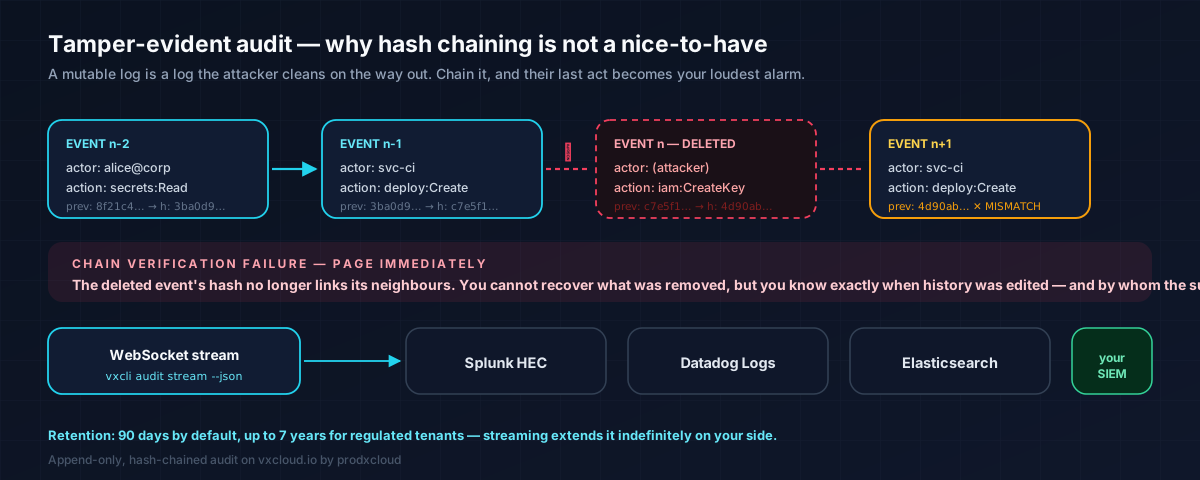
NIST tenet 7 is explicit: collect as much information as possible about asset state, network traffic and access requests, and use it to improve posture. Zero Trust without telemetry is theatre, because you cannot write dynamic policy against signals you never collected.
VxCloud's audit log is append-only and cryptographically hash-chained, with per-event tenant, actor, resource and IP attribution, retention configurable from 90 days to 7 years, and both a real-time WebSocket stream and a REST backfill API.
# 1. Issue a read-only, TTL-bound streaming token
#    Dashboard → Settings → Integrations → Audit Streaming → New token (default 30d)

# 2. Stream live, filter to the events that matter
vxcli audit stream --token aud_… --json | jq 'select(.decision=="DENY")'

# 3. Forward to Splunk HEC
vxcli audit stream --token aud_… --json | while read -r line; do
  curl -sH "Authorization: Splunk $SPLUNK_HEC" \
       -d "{\"event\": $line}" \
       "https://splunk.example.com:8088/services/collector/event"
done

# 4. Backfill a SIEM that just came online
vxcli audit events --since 2026-01-01 --until 2026-08-01 --json > backfill.jsonl
Detections to write on day one — cheap, and they catch real intrusions:
| Detection | Why it fires on a real intrusion |
|---|---|
Any DENY on a production resource | Lateral movement in a Zero Trust network looks like denied requests |
| Secret read outside business hours from a new IP | Credential harvesting after laptop compromise |
| New API key created, then used from a different ASN within 5 min | Key exfiltration, near-universally |
| Policy modified without a linked Git commit | Someone bypassed change control — or is not an employee |
| Service account authenticating from a residential IP range | Machine credential now in human hands |
| MFA method removed or downgraded | Classic account-takeover persistence step |
| Audit hash-chain verification failure | Page immediately. Someone is editing history |
That last row is why hash chaining matters more than people assume. A mutable log is a log an attacker cleans on the way out. Tamper-evidence converts your log from an artefact the attacker controls into one they cannot quietly touch.
Step 11 — Continuous validation: attack your own surface, weekly
Threat closed: the exposure you do not know about, which by definition is not covered by any policy you wrote.
Zero Trust policy only governs assets you know exist. Attack-surface discovery is therefore not "a pentest thing" — it is a prerequisite for the policy pillar, and it must run on a schedule, not on a project plan.
VxCloud's Guardian console ships 22 reconnaissance and posture tools you run against your own estate from the same console that provisions it.
| Category | Tools | What it catches |
|---|---|---|
| Exposure | Port Scan, Vuln Scan, Ping, Traceroute | The staging box someone gave a public IP "for a demo" in March |
| Crypto / TLS | SSL/TLS, Ciphers, Certs (Certificate Transparency) | Expiring certs, TLS 1.0 still enabled, certificates issued for your domain that you did not request |
| DNS | DNS, DNS×3 multi-resolver, DNS Propagation, Reverse DNS | Resolver tampering, stale records pointing at reclaimable cloud IPs (subdomain takeover) |
| Surface | Subdomains, Tech Detect, Headers, WHOIS | Forgotten hosts, missing HSTS/CSP, leaked stack versions |
| Reputation | IP Rep, Blacklist, VPN/Proxy detect, Routing (BGP/ASN), Threats | Your egress IP on a DNSBL, hostile ASNs, IOC enrichment |
| Credential | Dark Web exposure | Your users' credentials in breach corpora — before they are used against you |
# Add these to a weekly scheduled job. Not quarterly. Weekly.
vxcli networks port-check 443 --host <edge-host>
vxcli networks security-audit --host <host> --ssh-user ubuntu --key-pair-name <key>
Layer on continuous runtime posture with Observability — Prometheus, blackbox probing, native dashboards — so "the control silently stopped working in April" is something you find out in April.
Certificate Transparency monitoring deserves special mention. A certificate issued for your domain that you did not request is a five-alarm signal of DNS or registrar compromise, it is publicly logged, and almost nobody watches for it. Watch for it.
Step 12 — All of it in Terraform, reviewed in pull requests
Threat closed: configuration drift, and the "temporary" firewall rule from 2024 that nobody can now explain or safely delete.
If your Zero Trust posture lives in a web console, it is one distracted click from gone, with no diff, no reviewer and no rollback. Infrastructure as code makes security posture a reviewable artefact.
terraform {
  required_providers {
    vxcloud = { source = "prodxcloud/vxcloud" }
  }
}

provider "vxcloud" {
  # Token from environment / OIDC exchange — never hardcoded, never committed
  api_token = var.vxcloud_token
}

resource "vxcloud_vm" "api" {
  name          = "api-prod-use1"
  cloud         = "aws"
  region        = "us-east-1"
  size          = "t3.medium"
  # No public IP. Reachable only through the mesh and the IAP.
  assign_public_ip = false
  tags = { environment = "PRODUCTION", data_classification = "restricted" }
}
Then gate the plan with policy, so an insecure change cannot merge.
package terraform.security

import rego.v1

deny contains msg if {
    r := input.resource_changes[_]
    r.type == "vxcloud_vm"
    r.change.after.assign_public_ip == true
    r.change.after.tags.environment == "PRODUCTION"
    msg := sprintf("%s: production VMs must not have a public IP", [r.address])
}

deny contains msg if {
    r := input.resource_changes[_]
    r.change.after.ingress[_].cidr_blocks[_] == "0.0.0.0/0"
    msg := sprintf("%s: 0.0.0.0/0 ingress is never approved — use the IAP", [r.address])
}
terraform plan -out=tfplan && terraform show -json tfplan > plan.json
opa eval --format pretty --data policies/terraform.rego --input plan.json \
  'data.terraform.security.deny'    # non-empty ⇒ fail the build
The VxCloud Terraform provider covers multi-cloud VMs, networks and platform resources across AWS, Azure, GCP, Alibaba, Linode and Vultr — so your posture is one terraform plan away from being provable, and one git log away from being explicable.
The verification matrix: prove each control or delete it
Print this. Run it quarterly. A control nobody tests is a control that has already failed and has not told you yet.
| # | Control | Test | Pass criterion |
|---|---|---|---|
| 1 | Phishing-resistant MFA | Password-only login to production | Rejected |
| 2 | SSO enforced | Federated user attempts local password login | Rejected |
| 3 | SCIM deprovisioning | Deactivate user in IdP | Access + live session die within SLA |
| 4 | Key expiry | Use a key past expires_at | 401 |
| 5 | Key IP binding | Call from an IP outside allowed_ips | 403 |
| 6 | Read-only scope | POST with a read-only key | 403 |
| 7 | Explicit deny precedence | Admin attempts a production delete | DENY, matching the Deny Sid |
| 8 | MFA-gated secrets | Read a secret in a non-MFA session | DENY |
| 9 | No secrets in code | gitleaks / trufflehog over full history | 0 verified findings |
| 10 | Secrets absent at runtime | docker exec <c> env piped to grep -i secret | No output |
| 11 | Ingress segmentation | Unauthorised pod → database port | Timeout |
| 12 | Egress containment | Production pod → arbitrary internet host | Timeout |
| 13 | STRICT mTLS | Plaintext HTTP to a mesh service | Connection refused |
| 14 | Short-lived SVIDs | Inspect certificate notAfter | ≤ 1 hour |
| 15 | TLS floor | openssl s_client -tls1_2 | Handshake failure |
| 16 | Security headers | Guardian Headers tool | HSTS, CSP, XFO, XCTO, Referrer, Permissions all present |
| 17 | Tunnel scoping | Inspect AllowedIPs on every peer | No 0.0.0.0/0 on server-to-server |
| 18 | Session revocation | Break device posture mid-session | Access revoked without re-login |
| 19 | Policy propagation | Commit a policy change, time enforcement | < 60 s |
| 20 | Audit integrity | Verify the hash chain | Unbroken |
| 21 | SIEM ingestion | Trigger a test event | Visible in SIEM < 60 s |
| 22 | Attack surface | Weekly Guardian sweep | No unknown exposed services |
| 23 | Permission hygiene | Diff granted vs used over 90 days | Unused permissions revoked |
| 24 | Blast radius | Tabletop: engineer laptop compromised | ≤ 3 reachable resources |
Twelve misconfigurations that silently switch Zero Trust off
Every one of these has been observed in a real environment whose owners believed they were Zero Trust.
PERMISSIVEmTLS left on after migration. Plaintext still accepted. Eighteen months of false confidence.AllowedIPs = 0.0.0.0/0on a server-to-server WireGuard peer. You built a full-mesh highway and called it a segment.- Default-deny inbound, wide-open egress. You blocked the burglar's front door and left the loading bay open for the furniture.
- The break-glass account. No MFA, memorable password, "for emergencies." It is the emergency.
- Scopes stored but never enforced. The UI shows "read-only." The middleware never reads the column.
- Device posture checked at enrolment only. Compliance is continuous or it is fiction.
AllowTcpForwarding yeson SSH. Every engineer has a personal, unlogged tunnel around your network controls.- Wildcard service-account permissions added at 2 a.m. to fix an outage, never revisited.
- Audit log in a mutable table. The attacker's last act is
DELETE FROM audit WHERE actor = …. - Policy in a wiki. Not in the data path ⇒ not a control ⇒ a wish with formatting.
- The IdP itself lacking MFA on admin accounts. You federated everything to one system and left its own front door open. Attackers go for the IdP first because everyone does this.
- Zero Trust everywhere except the AI stack. Agents holding long-lived provider keys, unauthenticated model endpoints, RAG retrieval that trusts the UI to filter by tenant. Treat every agent as a principal: service-account identity,
vxarn-scoped policy, expiring tokens, per-call tool authorisation, every action in the audit log. Agent Control governs agents, models, datasets and endpoints under the same grammar and the same engine as your VMs — which is the entire point.
The 90-day checklist
| Window | Do this | Moves which metric |
|---|---|---|
| Week 1 | Baseline blast radius; enable audit streaming to SIEM; run a full Guardian sweep | Visibility — everything depends on it |
| Week 2 | WebAuthn MFA enforced org-wide; enforce_sso + disable_password_login; SCIM on | Credential theft |
| Week 3 | Inventory every long-lived credential; convert automation to service accounts; expiry on all keys | Long-lived credentials → 0 |
| Week 4 | Adopt the resource grammar (vxarn); write and simulate the first 5 policies | Makes least privilege expressible |
| Weeks 5–6 | Secrets into Vault; scrub Git history; gitleaks in CI | Secret sprawl |
| Weeks 7–8 | Default-deny ingress and egress on one production segment; K8s NetworkPolicy | Blast radius — the big one |
| Weeks 9–10 | STRICT mTLS + SPIFFE for all new services; TLS 1.3 floor at the edge | East-west interception, static service keys |
| Weeks 11–12 | Two internal apps behind the identity-aware proxy; device posture as a required signal | VPN dependency |
| Day 90 | Re-measure blast radius; run the 24-test verification matrix; publish the delta | Proves the programme |
| Days 90–180 | Micro-segment the rest of production; decommission user-facing VPN; automate SOC 2 / ISO evidence from the audit log | Blast radius, audit cost |
FAQ
What's the single highest-value configuration change I can make this week? Phishing-resistant MFA (WebAuthn) enforced on every production path, with password login disabled. It closes the vector that appears in more incident reports than any other. Second place: default-deny egress on one production segment.
Do I need Kubernetes and a service mesh to do Zero Trust? No. Steps 1–4, 7, 8, 10, 11 and 12 apply to plain VMs. Micro-segmentation on VMs is ufw and security-group default-deny plus per-request authorisation at an identity-aware proxy. The mesh makes Step 6 easier; it is not a prerequisite.
Won't default-deny egress break everything? It will break some things, loudly, for about a week — which is the point: you are discovering undocumented dependencies you did not know production had. Roll it out on one segment, log denials before enforcing, allowlist what is real, then enforce.
How do I do this across AWS and Azure and GCP without four policy languages? One resource grammar, one policy engine, one audit stream — which is what VxCloud centralises. Four separate cloud-native IAM systems is not Zero Trust; it is four perimeters in a trench coat.
We're regulated and can't send data to a SaaS control plane. Then do not. Self-hosted VxCloud deploys into your own VPC or air-gapped on-prem, with BYO IdP, BYO secrets store and BYO SIEM. Data residency is a Zero Trust data-pillar requirement, not a preference.
How do I configure Zero Trust for AI agents? Identically to any other principal, because that is what they are: service-account identity, vxarn-scoped least privilege, short-lived tokens, per-call tool authorisation, per-tenant isolation on the vector store, an identity-aware proxy in front of every inference endpoint, and every tool call in the audit log.
What proves to an auditor that these controls work? The 24-test verification matrix above, plus audit-log evidence generated from the hash-chained stream and mapped to SOC 2 CC6/CC7 and ISO 27001 A.5/A.8. Generated evidence beats screenshots, at a fraction of the labour cost.
How long until we're "done"? You are never done — Zero Trust is a continuous posture, not a milestone. But you should see measurable blast-radius reduction in 90 days and mature posture in 180. If your programme has no measurable delta at day 90, it is a governance failure, not a technology failure.
References
- NIST, SP 800-207: Zero Trust Architecture — csrc.nist.gov
- NIST NCCoE, SP 1800-35: Implementing a Zero Trust Architecture — nccoe.nist.gov
- CISA, Zero Trust Maturity Model v2.0 — cisa.gov
- US OMB, M-22-09: Federal Zero Trust Strategy — whitehouse.gov
- Executive Order 14028 — federalregister.gov
- US DoD CIO, DoD Zero Trust Strategy — dodcio.defense.gov
- Verizon, Data Breach Investigations Report — verizon.com
- IBM Security, Cost of a Data Breach Report — ibm.com
- Google, BeyondCorp — research.google
- OpenSSH, sshd_config(5) — man.openbsd.org
- SPIFFE / SPIRE — spiffe.io
- Open Policy Agent, Rego policy language — openpolicyagent.org
- IETF, RFC 8446: TLS 1.3 — rfc-editor.org
- NIST, SP 800-207A — csrc.nist.gov
- J. A. Donenfeld, WireGuard, NDSS 2017 — wireguard.com
- MITRE ATT&CK, Lateral Movement (TA0008) — attack.mitre.org
- CISA, Emergency Directive 24-01 (Ivanti) — cisa.gov
- CISA, Known Exploited Vulnerabilities Catalog — cisa.gov
- NIST NVD, CVE-2023-4966 (Citrix Bleed) — nvd.nist.gov
- NIST NVD, CVE-2018-13379 (FortiOS SSL VPN) — nvd.nist.gov
- CIS, CIS Benchmarks — cisecurity.org
- NIST, SP 800-63B: Digital Identity Guidelines — pages.nist.gov
- OWASP, Secrets Management Cheat Sheet — cheatsheetseries.owasp.org
- Cloud Security Alliance, Cloud Controls Matrix v4 — cloudsecurityalliance.org
- Kubernetes, Network Policies — kubernetes.io
- Istio, Security: mutual TLS & authorization policy — istio.io
- HashiCorp Vault, Database secrets engine — developer.hashicorp.com
- NIST, SP 800-53 Rev. 5 — csrc.nist.gov
- UK NCSC, Zero Trust Architecture Design Principles — ncsc.gov.uk
- GitHub, Security hardening with OpenID Connect — docs.github.com
- VxCloud Terraform Provider — registry.terraform.io
- VxCloud Security & Compliance — vxcloud.io/pages/web/security
Configure it on a platform that was built for this
You can assemble every control above from a dozen vendors and spend two years integrating them. Or you can run them from one control plane that already speaks one resource grammar, one policy engine and one audit stream — across AWS, Azure, GCP, Alibaba, Linode, Vultr and your own bare metal, or fully self-hosted in your VPC or air-gapped facility.
VxCloud, by prodxcloud, ships the enforcement plane described in this playbook:
- Identity — SAML 2.0 / OIDC SSO, WebAuthn + TOTP MFA, SCIM,
vxarn-scoped policies with explicit-deny precedence - Secrets — per-workspace HashiCorp Vault namespace, just-in-time resolution, server-side key generation, CMK support
- Network — per-tenant VPCs, default-deny security groups, managed L7 load balancers with automatic TLS, WAF, mTLS to tenant nodes
- Transport — managed WireGuard, OpenVPN, IPSec/IKEv2, L2TP, SSTP, OpenConnect, SoftEther; mesh, hub-and-spoke, site-to-site
- Visibility — Guardian's 22 recon and posture tools, Prometheus-backed observability, and an append-only, hash-chained audit log streaming to Splunk, Datadog or ELK
- AI governance — agents, models, datasets and endpoints as first-class governed resources under the same policy engine
- Everything as code — official Terraform provider, CLI parity, SDKs in Python, TypeScript, Go, C++ and Java
Get started:
- Security model & compliance: vxcloud.io/pages/web/security
- Zero Trust architecture: vxcloud.io/pages/web/enterprise/zero-trust-security
- Networking & VPN: Networking · VPN
- CLI & guides: CLI reference · Guides
- Self-hosted / air-gapped: vxcloud.io/pages/web/self-hosted
- Create your account free: prodxcloud.com/auth/register
Previously in this series: Zero Trust Architecture in 2026 — Your Perimeter Is Already Breached.


